Participants:
VOLTRANS : VPCO, ACCMGR, BIZSQUAD LEADERS, PT, CS, DOC, ILD
FREIGHTEK : CEO, FREIGHTEK STAFFS
Main purpose: Freightek Team guided on how to input shipment data related to VOL/LAT operations.
Detailed meeting notes
Each user is allowed to manage only one LAT account, without mixing data between VOLTRANS and LAT. No replication of data between systems, and no adding information retroactively.
LAT will be a separate workspace, without shared data with VOLTRANS. CUSTOMERS WILL RECEIVE INVOICES FROM VOLTRANS, and must follow the workflow below.
For shipments booked under LAT Global accounts (COSCO, MSK, MCC, etc.), CUSTOMERS WILL RECEIVE INVOICES FROM VOLTRANS, and must follow the workflow below.
1/ Export Shipments (VOL → LAT) – Cost & Charge Workflow Per PT Team
Sales will create shipments under VOLTRANS accounts following the structure below:
+ Branch: Office handling the shipment (VOL H0, VOL HAN, VOL HAN, VOL CAM, etc.)
+ Provider (Buying): LAT GLOBAL. This is the buying charge (provider = LAT). PT team will input the buying price for the sales team (including Local Charges).
+ Lead Client (Selling): CUSTOMER / AGENT / CONTROL PARTY selected by the sales team
CS will create related shipments under LAT Global with the same structure as Sales (but not replicating any data entered earlier).
+ Reference ID: Edit to match the Shipment ID of the original VOLTRANS shipment.
+ Provider: Shipping line
+ Lead/Client: VOLTRANS
Selling = buying (freight + local charge)
***Important note: For each shipment, LAT creates buying charges for the provider (shipping line), and all additional charges. VOLTRANS will issue invoices to customers. LAT does NOT issue any invoice to VOLTRANS customers. Charges entered into LAT will flow into VOLTRANS shipments as provider = vendor, client = customer.
- DOC Team inputs additional Credit Notes (local charges or other fees) into the shipment costing.
- PT team will enter/confirm CREDIT NOTES and input BILLIN /DEBIT NOTES (SELLING to VOLTRANS) for LAT shipments. PT will input all extra charges collected on LAT shipments.
- PT Team will also enter / confirm CREDIT NOTES (BUYING) for VOLTRANS shipments.
- FIN team will issue DEBIT NOTES to customers for VOLTRANS on VOLTRANS SHIPMENTS.
*** Additional charges (amendment fee, late payment fee, etc.) will be the responsibility of PT Team to input into both VOL/LAT shipments → PT must inform Sales so Sales can notify the customer, depending on each case.
2/ Export shipments (only designated charges, no local charges) / inputting without PT price approval
SALES will create shipments under VOLTRANS account following the structure below:
+ Branch: Handline office (VOL HO, VOL HAN, VOL CAM…)
+ PROVIDER (BUYING): LAT GLOBAL. This is the buying WO that PT team enters for Sales (including Local Charges)
+ Lead Client (Selling): CUSTOMER / AGENT / CONTROL PARTY assigned by Sales
SALES will create another shipment under LAT Global with the same structure (no replicating previous data)
+ Reference ID: Edit to match the shipment ID of the VOLTRANS shipment.
+ Provider: Shipping line
+ Lead/Client: VOLTRANS
Selling = buying (freight + local charge)
***Important note: For exports, LAT will create all charge codes related to the PROVIDER (shipping line), plus trucking, and any extra service charges. ONLY VOLTRANS issues invoices to customers. LAT does NOT issue invoices to VOLTRANS customers. Charges entered into LAT will flow into the corresponding VOLTRANS shipment as: Provider = VENDOR, Client = CUSTOMER.
- DOC team will enter additional Credit Notes (local or extra charges) into the shipment costing.
- SALES will enter / confirm the CREDIT NOTE and input BILLING / DEBIT NOTE (SELLING TO VOLTRANS) for LAT shipments.
- SALES will enter / confirm the CREDIT NOTE for VOLTRANS shipments (BUYING).
- FIN will issue DEBIT NOTES to VOLTRANS customers on VOL shipments.
2/ Export shipments (only designated charges, no local charges) / inputting without PT price approval
SALES will create shipments under VOLTRANS account following the structure below:
+ Branch: Handline office (VOL HO, VOL HAN, VOL CAM…)
+ PROVIDER (BUYING): LAT GLOBAL. This is the buying WO that PT team enters for Sales (including Local Charges)
+ Lead Client (Selling): CUSTOMER / AGENT / CONTROL PARTY assigned by Sales
SALES will create another shipment under LAT Global with the same structure (no replicating previous data)
+ Reference ID: Edit to match the shipment ID of the VOLTRANS shipment.
+ Provider: Shipping line
+ Lead/Client: VOLTRANS
Selling = buying (freight + local charge)
***Important note: For exports, LAT will create all charge codes related to the PROVIDER (shipping line), plus trucking, and any extra service charges. ONLY VOLTRANS issues invoices to customers. LAT does NOT issue invoices to VOLTRANS customers. Charges entered into LAT will flow into the corresponding VOLTRANS shipment as: Provider = VENDOR, Client = CUSTOMER.
- DOC team will enter additional Credit Notes (local or extra charges) into the shipment costing.
- SALES will enter / confirm the CREDIT NOTE and input BILLING / DEBIT NOTE (SELLING TO VOLTRANS) for LAT shipments.
- SALES will enter / confirm the CREDIT NOTE for VOLTRANS shipments (BUYING).
- FIN will issue DEBIT NOTES to VOLTRANS customers on VOL shipments.
***Additional charges (amendment fee, late payment fee, etc.) will be entered by SALES into both VOL/LAT shipments → Sales must inform the salesperson whether these charges will be collected from the customer or not, depending on each case.
***For designated export shipments, the CS Team will create a separate shipment under the LAT GLOBAL account
REGARDING REPORT BONUS/TIMING FOR DETERMINING DONE COSTING/BILLING FOR SHIPMENTS
Salesman / DOC / PT / ILD must complete and confirm all charge codes related to the shipment according to the deadline below,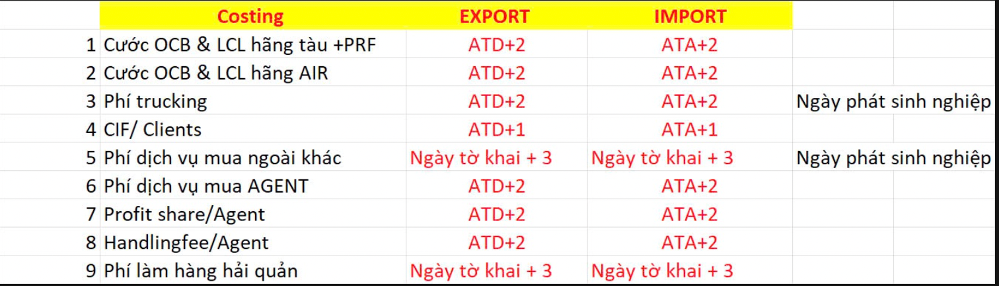
And perform an additional step: Confirm Report Done. This confirmation step notifies the Accounting team that all charge codes (costing) for the shipment have been fully entered in the system, and it serves as the basis for calculating the salesperson’s bonus.
Deadline for Confirm Report Done: ATD + 3 days
If any charge code is still pending, the user must set the Report Status to Pending and clearly provide the reason for the pending charge.
The “Confirm Report Done” module will be permission-controlled and assigned only to ACE Salesman.
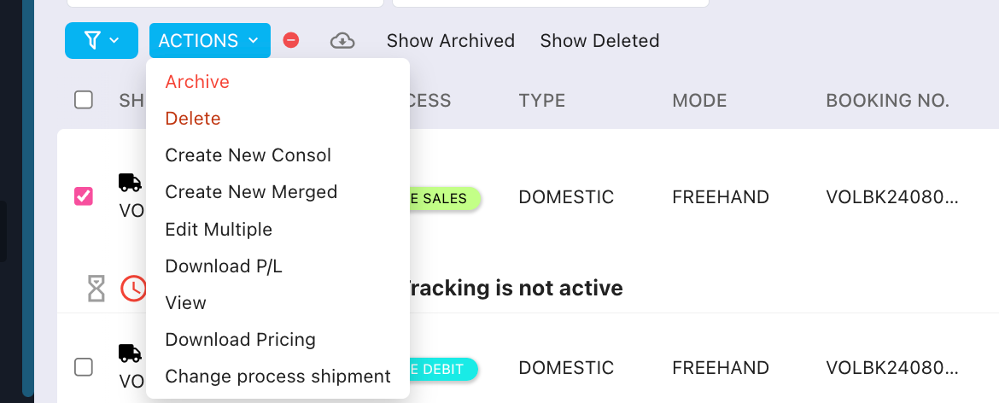
How to perform the action: Select Shipment ID → Action → Change Report Status.
Was this article helpful?
That’s Great!
Thank you for your feedback
Sorry! We couldn't be helpful
Thank you for your feedback
Feedback sent
We appreciate your effort and will try to fix the article