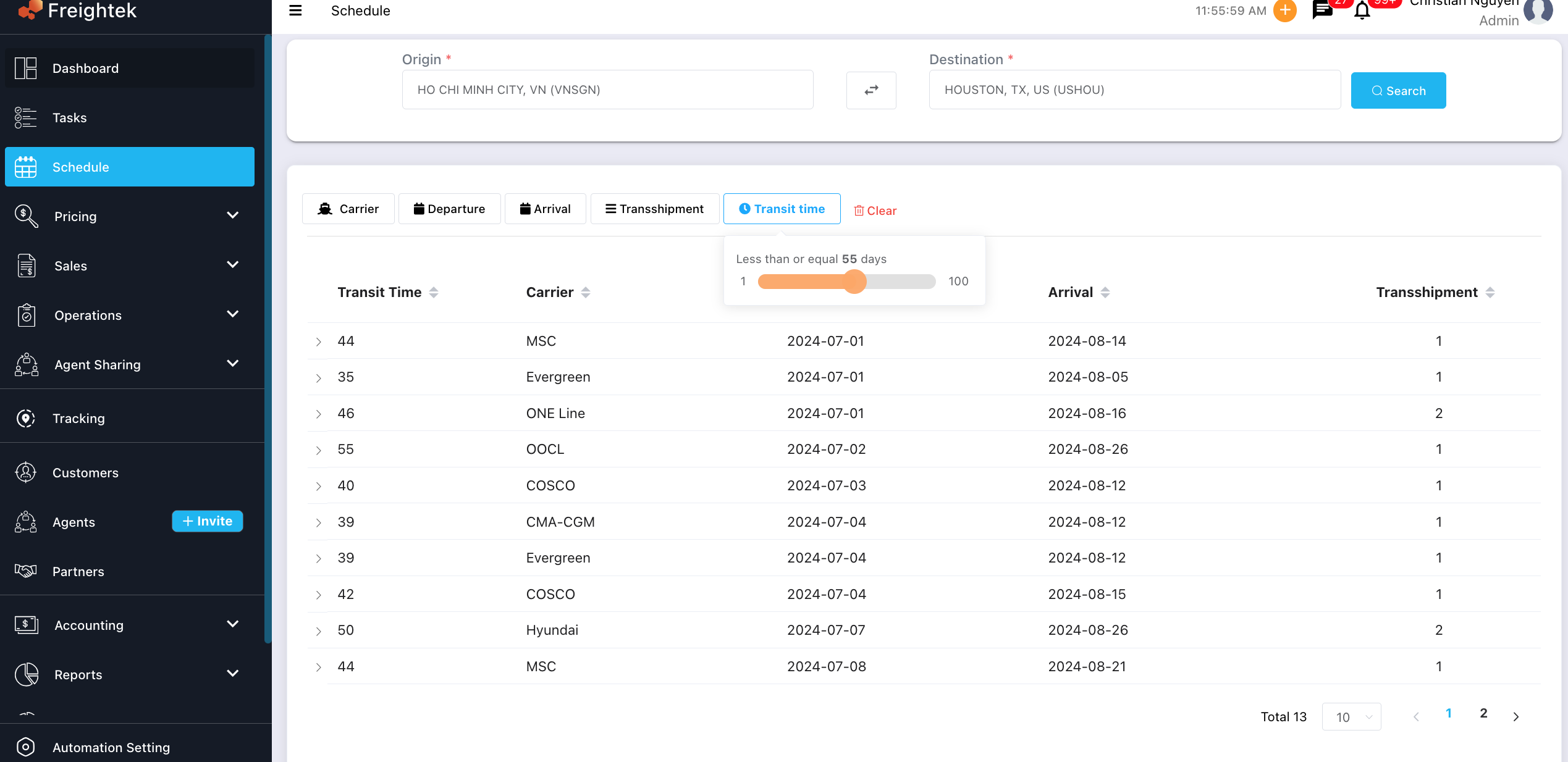
You can search for vessel schedules based on Origin, Destination, and multiple filter options to quickly find suitable routes.
Step 1: Select Origin & Destination
Go to Schedule from the left menu.
Enter Origin (e.g., HO CHI MINH CITY, VN – VNSGN)
Enter Destination (e.g., HOUSTON, TX, US – USHOU)
Click Search
The system will display all available vessel schedules for the selected route.
Step 2: Use Filters to Refine Results
You can filter vessel schedules by:
1. Carrier: Filter by shipping line (MSC, Evergreen, OOCL, COSCO, etc.)
2. Departure Date: View voyages by ETD.
3. Arrival Date: View voyages by ETA.
4. Transshipment: Filter by number of transshipments.
5. Transit Time: Use the slider to choose the maximum number of transit days.
Example: “Less than or equal 55 days”
Step 3: Review Schedule Details
The result table will display:
Transit Time (days)
Carrier
Departure Date (ETD)
Arrival Date (ETA)
Transshipment Count
Was this article helpful?
That’s Great!
Thank you for your feedback
Sorry! We couldn't be helpful
Thank you for your feedback
Feedback sent
We appreciate your effort and will try to fix the article