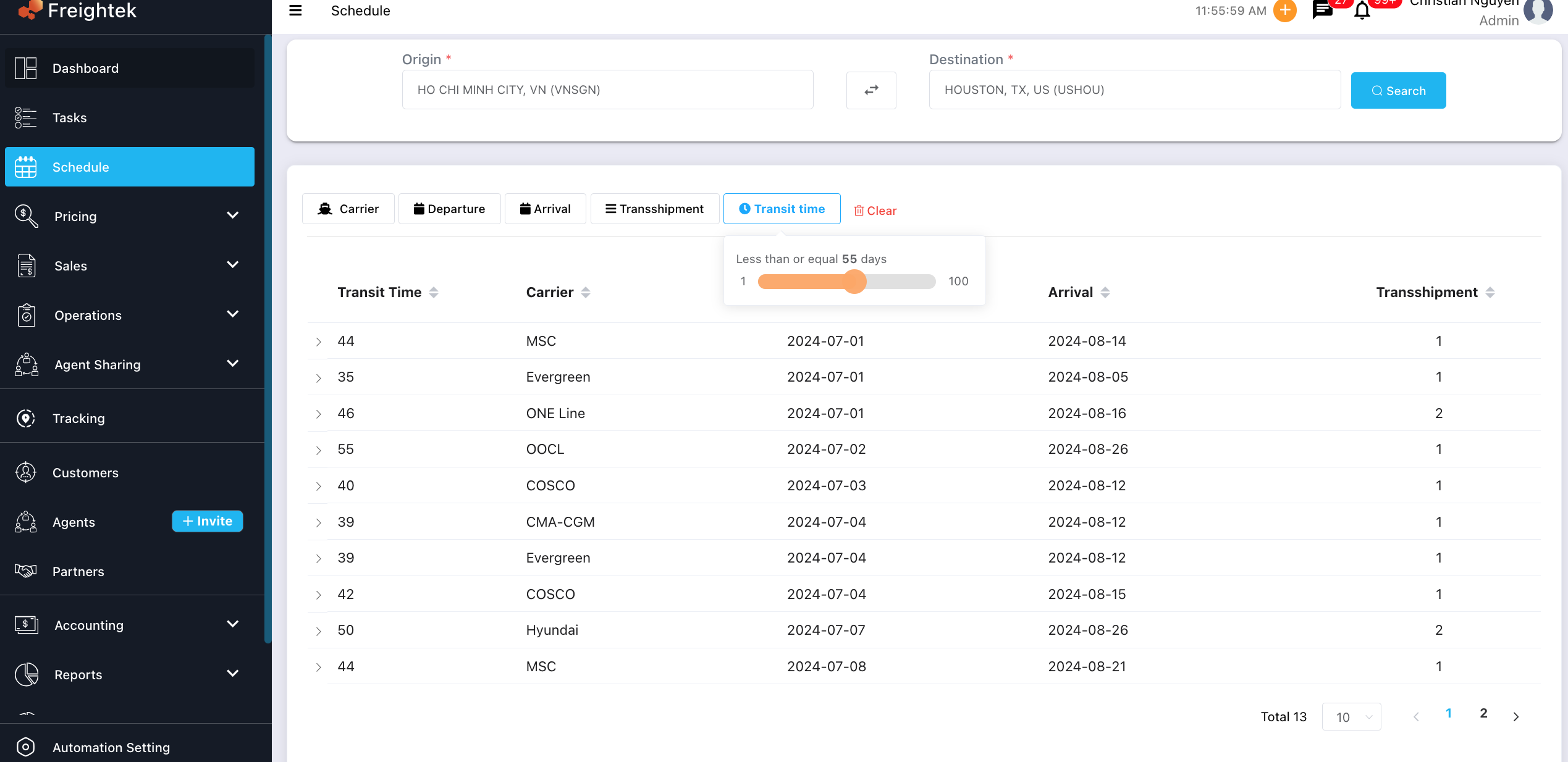
You can search for vessel schedules based on the origin and destination you need.
Step 1: Go to the Schedule module
From the left menu, select Schedule.
Step 2: Enter Origin and Destination
Fill in the required fields:
Origin: the port or location where the cargo is loaded
Destination: the port or location where the cargo will be delivered
Then click Search.
Step 3: Use filters to narrow results
You can apply additional filters to refine the list:
Carrier: filter by shipping line
Departure: filter by ETD
Arrival: filter by ETA
Transshipment: filter by number of transshipments
Transit Time: use the slider to filter schedules with specific transit times
Step 4: View schedule results
The system will display:
Transit Time
Carrier
Departure Date (ETD)
Arrival Date (ETA)
Number of Transshipments
Was this article helpful?
That’s Great!
Thank you for your feedback
Sorry! We couldn't be helpful
Thank you for your feedback
Feedback sent
We appreciate your effort and will try to fix the article